
A ThoughtSpot instance is allocated to customers upon registration and license purchase. Users with a valid license can use their ThoughtSpot application URL to access their instance, whereas evaluating users can use the free-trial instance to try out ThoughtSpot features. For example, https://Xyz-company.thoughtspot.cloud/, my1.thoughtspot.cloud (free-trial instance). You can find your instance URL in account activation emails sent to your registered email address.
Frequently Asked Questions
Table of Contents
This article includes answers to some of the most commonly asked questions about embedding ThoughtSpot in an app.
For more FAQs and community help with deployment-related issues, visit the ThoughtSpot Community site.
ThoughtSpot application🔗
What is my ThoughtSpot instance?
What is a ThoughtSpot Host?
Your ThoughtSpot application instance URL is also referred to as ThoughtSpot Host, thoughtspotHost, tsURL, TS_HOST. The instance URL is required to initialize your embedded application and sign in to ThoughtSpot extensions, such as the Vercel integration, business app integration, and ThoughtSpot Google plugins.
What is a Liveboard?
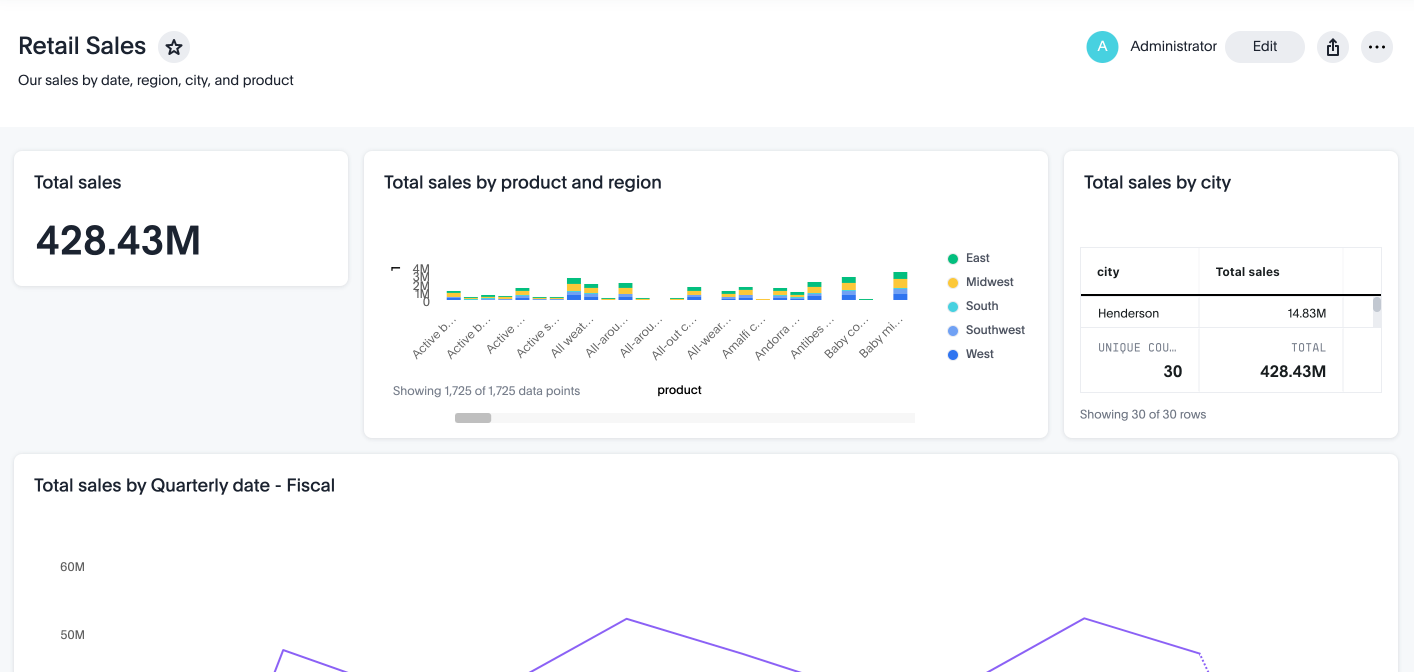
A ThoughtSpot Liveboard is a collection of charts and tables saved by a user for live analytics. A typical Liveboard presents the charts and tables on a single page and allows you to apply filters, explore, edit, and download data, and schedule notifications.
What is a data source?
A data source is a data object, such as a Model, Table, or View, from which users can search data and create Answers and visualizations.
APIs and SDK🔗
Which ThoughtSpot components can I embed in my app?
You can embed any of the following components, or the entire ThoughtSpot experience:
-
Search page
-
Liveboard
-
Individual visualizations from a Liveboard
-
Spotter (AI-powered natural language search and analytics)
-
Specific pages of the application or the full application
ThoughtSpot provides the following embedding options:
-
Visual Embed SDK for JavaScript and TypeScript web applications
-
React client library for React applications
What is Visual Embed SDK?
The Visual Embed SDK is a JavaScript library using which you can embed ThoughtSpot application and its components in your web app.
My app doesn’t allow custom JavaScript. Can I embed ThoughtSpot in my app?
We recommend using Visual Embed SDK to embed ThoughtSpot in your app. However, if your application doesn’t allow custom JavaScript, you can embed ThoughtSpot in an iFrame without using the SDK.
To embed ThoughtSpot without using the Visual Embed SDK:
-
Your app must allow iFrame embedding
-
Your app must support SSO authentication
For more information, see Embed without SDK.
What kind of customizations can I do with the Visual Embed SDK?
The Visual Embed SDK not only allows you to embed ThoughtSpot, but also provides APIs and object properties to customize your embedded view. The SDK allows you to:
-
handle callback custom actions that trigger a callback and send ThoughtSpot data in a response payload to the parent app.
Can I embed ThoughtSpot in a React app?
Yes. ThoughtSpot provides a client library using which you can embed ThoughtSpot components in a React app. For more information, see Embed ThoughtSpot in a React app.
What is Spotter?
Spotter is ThoughtSpot’s AI-powered natural language search and conversational analytics engine. It provides a chat interface for users to ask questions about their data in plain language and receive instant, business-ready insights and visualizations.
For more information, see Spotter documentation.
Can I embed Spotter in my application?
Yes. You can embed the Spotter interface in your application using the SpotterEmbed component in the Visual Embed SDK. For more information, see Embed AI Search and Analytics and Embed Spotter experience.
Which Spotter version should I embed?
The right Spotter version depends on your use case.
-
Spotter 3 (Recommended)
Use when you want the most advanced AI analytics experience, including automatic data model discovery, deep research mode, chat history, and MCP connector support. Available from ThoughtSpot Cloud 26.2.0.cl and later. -
Spotter 2 (Spotter Agent)
Use when you want agentic AI analytics with richer contextual insights but do not require Spotter 3 features. -
Spotter Classic
Use when you need only metadata-level insights and do not require agentic workflows.
Contact your ThoughtSpot administrator to enable the required Spotter version on your instance. For more information, see Spotter in embed mode.
Can I integrate Spotter into a custom chatbot?
Yes. You can integrate Spotter in your custom application or chatbot by using the ThoughtSpot Spotter MCP Server. For more information, see Integrating Spotter MCP Server in a custom application or chatbot.
ThoughtSpot Embedded🔗
What is ThoughtSpot Embedded?
ThoughtSpot Embedded is a low-code embedded analytics platform with several features that significantly enhance the embedding experience. Some of these features include:
-
The SDK and APIs for quick and easy embedding experience
-
An interactive developer portal with the following functions:
-
Developer Playgrounds to explore the Visual Embed SDK and REST API and try out embedding workflows
-
Customization controls for the embedded view
-
Advanced security settings
-
For more information, see Embedded analytics with ThoughtSpot Embedded.
What features are available with the ThoughtSpot Embedded license?
ThoughtSpot Embedded provides access to Visual Embed SDK, which you can use to embed ThoughtSpot Search, Liveboards, visualizations, or the full ThoughtSpot experience in your app.
ThoughtSpot Embedded also provides access to REST APIs, using which you can deploy and manage your embedded instance.
For a complete list of features, see Feature matrix and license types.
Do I need a license to embed ThoughtSpot in my app?
To embed ThoughtSpot, you require a ThoughtSpot Embedded license. For more information, see Get started with ThoughtSpot Embedded.
Can I preview the SDK and APIs?
Yes. You can explore Visual Embed and REST API SDK features and preview the coding experience in the developer Playground on the public site.
-
To embed ThoughtSpot in a sample app and view results instantly, use the Visual Embed Playground.
-
To make REST calls and view the request and response workflow, use the REST API playground.
How do I sign up for a free trial?
To sign up for a 30-day free trial, click Free Trial on the ThoughtSpot developers website. For more information about features available for evaluation, see Feature matrix and license types.
Can I use a ThoughtSpot Software instance to embed ThoughtSpot?
Starting from 8.4.1-sw release, customers with license to embed ThoughtSpot can use the Visual Embed SDK for embedded analytics.
Do I need a ThoughtSpot Embedded license to customize and rebrand my ThoughtSpot instance?
If you want to rebrand UI elements, customize the fonts and color scheme of your charts, you can use the Style customization functionality available in the Develop or Admin tab. This option is available on all instances and doesn’t require a ThoughtSpot Embedded license.
However, for advanced customization controls, we recommend using ThoughtSpot Embedded features. For more information, contact ThoughtSpot Support.
Authentication, security, and access control🔗
What types of authentication schemes does the Visual Embed SDK support?
-
Basic authentication (Use it for development and testing purposes only)
What is cookieless authentication and when should I use it?
Cookieless authentication (AuthType.TrustedAuthTokenCookieless) uses a bearer token instead of session cookies to authenticate embedded ThoughtSpot content. Use this method when:
-
Your embedded application is served from a different domain than your ThoughtSpot instance, and the user’s browser blocks third-party cookies.
-
You require a stateless authentication flow that does not depend on cookie persistence.
To use cookieless authentication:
-
Enable Trusted authentication on your ThoughtSpot instance.
-
Set
authTypetoAuthType.TrustedAuthTokenCookielesswhen initializing the SDK. -
Set
refreshAuthTokenOnNearExpiry: trueto enable proactive token refresh and prevent session interruptions.
For more information, see Authentication.
Can I sync users and groups with ThoughtSpot?
Yes. You can use the /api/rest/2.0/users/import endpoint to create or update users and groups programmatically. This is the recommended approach for new integrations. For more information, see REST API v2.0 Reference.
To sync users and groups from Active Directory, you may need to use an AD sync script provided by ThoughtSpot. For assistance, contact ThoughtSpot Support.
What is the default SSO experience with embedded ThoughtSpot instances?
By default, the SAML SSO users will see the ThoughtSpot login page with a link to log in via SSO. To enable automatic SAML redirection on your instance, contact ThoughtSpot Support.
If you are embedding without the Visual Embed SDK or using AuthType.None, the IdP flow will occur when the ThoughtSpot content is loaded. However, you need to configure your IdP to allow the flow to complete.
Can I limit user access to features?
You can use any of the following features to restrict user access to the embedded component or view:
-
Groups and privileges
The group privileges determine the access level of a user.
-
Sharing visibility
You can set users and groups as
SHAREABLEto allow sharing content between users. If a user or group is set asNON-SHAREABLE, ThoughtSpot doesn’t allow sharing objects with this user or group. -
Object-level permissions
Object owners can share objects with other users or groups, and set
READ-ONLYorMODIFYpermissions -
Row-level security (RLS) and column-level security (CLS) to limit access to table rows and columns
-
Granular access control to limit access to buttons and menu actions in the embedded app (applicable to embedded ThoughtSpot instances).
The Visual Embed SDK allows showing, hiding, and disabling UI actions. For example, you can disable menu actions in the Liveboard menu.
For more information about access control, see Access control and data security and Authentication and authorization.
Can I sync groups in SAML assertions with ThoughtSpot?
You can map a user’s groups in the SAML assertion with ThoughtSpot. For more information, see Configure SAML group mapping.
Can I restrict my embed application users from accessing the non-embedded ThoughtSpot instance?
If you have a single ThoughtSpot cluster and you have embedded the full ThoughtSpot application in another app, you may want to prevent external users from accessing your non-embedded ThoughtSpot instance. ThoughtSpot allows you to restrict embed users from accessing your non-embedded ThoughtSpot instance using a TSCLI command. Contact ThoughtSpot Support to enable this flag on your instance.
Orgs and multi-tenancy🔗
What are Orgs?
Orgs is ThoughtSpot’s multi-tenancy feature. It allows you to create isolated tenant containers within a single ThoughtSpot instance, each with its own users, groups, and data objects. Orgs are typically used for:
-
Logical separation of departments within a single organization
-
Supporting multiple distinct customer tenants from a single ThoughtSpot deployment
Each Org functions as an independent environment. Users assigned only to one Org experience ThoughtSpot as if it were a single-tenant deployment. Users with access to multiple Orgs can switch between them using a menu.
Orgs are enabled by default on new ThoughtSpot Enterprise cloud instances. For more information, see Multi-tenancy with Orgs.
Do I need a special license to use Orgs?
Yes. The Orgs multi-tenancy feature requires the ThoughtSpot Analytics Enterprise Edition or ThoughtSpot Embedded license. For more information, see License types and pricing.
How do Orgs work with the Visual Embed SDK?
When embedding ThoughtSpot in a multi-tenant deployment using Orgs, you can scope authentication tokens and API requests to a specific Org. Use the orgId parameter in your trusted authentication token request to authenticate users into the correct Org context.
For more information, see Multi-tenancy with Orgs and Org administration via API.
Can I manage Orgs programmatically?
Yes. ThoughtSpot REST API v2.0 provides endpoints to create, update, and manage Orgs. You must have cluster administrator privileges to create and manage Orgs.
For more information, see Org administration via API.
Customization and rebranding🔗
Can I change the look and feel of ThoughtSpot?
ThoughtSpot allows customizing UI elements, chart colors, logo, fonts, footer text, and other such style modifications. For more information, see Customization and rebranding.
Do I need a ThoughtSpot Embedded license to customize the UI layout?
No. The Style customization feature is available on ThoughtSpot Cloud and ThoughtSpot Software deployments with the standard license. This feature is available to all ThoughtSpot users with Administrator or Developer privilege.
Can I remove ThoughtSpot branding?
-
UI Layout and style customization
The style customization feature allows rebranding UI elements, logo, fonts, and color scheme of charts and tables. If you want to remove the Powered by ThoughtSpot logo, contact ThoughtSpot Support. -
Email customization
If you want to use a specific domain name and sender ID in the system-generated email notifications, contact ThoughtSpot Support. -
URL with custom domain name
To customize the domain name of your ThoughtSpot instance, contact ThoughtSpot Support.
Can I control the layout of content on a Liveboard?
Embedded Liveboards are rendered in the same layout as they were created with, but are responsive for different screen sizes. Individual visualizations can be embedded separately on a single page of your application, which gives you more control of the layout.
Advanced customization and layout controls are available with the new Liveboard experience.
Can I remove the ThoughtSpot logo from generated PDFs?
Yes. If you have customized the wide logo in the Style customization page, it will be displayed as the primary logo in PDFs. By default, the ThoughtSpot logo is displayed at the bottom of the title page. To disable this logo, contact ThoughtSpot Support.
Custom actions🔗
What are custom actions?
Custom actions allow you to add custom buttons and menu items to ThoughtSpot visualizations and Liveboards. Your application users can use these actions to pass ThoughtSpot data to the code you control in the host app, or to a specific URL target.
For more information, see Custom actions.
Should I get a ThoughtSpot Embedded license to use custom actions?
Not all types of custom actions require a ThoughtSpot Embedded license. Any ThoughtSpot user with Administrator or Developer privilege can create a URL-based custom action. Callback custom actions are supported only on embedded ThoughtSpot instances and require a ThoughtSpot Embedded license.
For more information, see Custom actions and see Feature matrix and license types.
I created a custom action, but don’t see it in the context menu.
-
Did you select the On by default on all visualizations checkbox when creating a custom action? If yes, the action will appear in the More
 menu of your visualization. If you want to add it to the contextual menu, edit the position of the action by using the edit icon in the Custom actions
  panel on your visualization page.
 -
If you did not select the On by default on all visualizations checkbox in the custom action creation pop-up, the action will be designated as a
Localaction. You must assign this action to a visualization, saved Answer, or Model of your choice and place it in the context menu.
|
Note
| By default, custom actions are visible only to users with administrator or developer privilege. To make the custom action available to your end users, select the user group in Show Advanced Availability Settings and allow access. |
Can I restrict access to custom actions?
Yes. You can set the custom action availability to one or several groups. Users with Administrator or Developer privilege can set the custom action to be available globally on all visualizations or allow authorized users to assign it to the visualization of their choice.
Can I trigger custom actions programmatically?
You can use the /tspublic/v1/pinboarddata API and the /tspublic/v1/searchdata API to pull data out of ThoughtSpot, read it, and then take action on it conditionally based on the results. For example, you could send a programmatic query to read Sales data from last week and then send an email if they were over or under a certain threshold.
Can I use custom actions to connect to third-party applications?
Yes. ThoughtSpot custom actions allow you to send data from ThoughtSpot visualizations and Liveboards to third-party applications.
-
URL actions: Send data to an external URL endpoint. Useful for connecting to applications that expose a webhook or REST endpoint.
-
Callback actions: Pass data back to your host application using the Visual Embed SDK event system, where your application code handles the data and routes it to the target system.
For more information, see Custom actions.
Can I pass authentication information with custom action?
The URL-based custom actions allow you to pass authentication information in the custom action API call. For more information, see URL actions.
Can I pass key-value pairs as parameters with custom action URLs?
The URL-based custom actions allow you to pass query parameters as key-value pairs. For more information, see URL actions.
REST API🔗
What is ThoughtSpot REST API?
The ThoughtSpot REST API allows you to send API requests directly to the ThoughtSpot server from your application client. You can use it to query the data, automate deployments using TML, manage users, groups, sessions, and objects, view logs and so on.
What’s the difference between the REST API and the Visual Embed SDK?
The Visual Embed SDK is a JavaScript library specifically used for embedding ThoughtSpot web components into your web app, such as Search, Liveboards, and Visualizations. You can use REST APIs along with Visual Embed SDK to programmatically deploy, manage, and control embedded objects.
How is REST API v1 different from REST API v2.0?
The REST API v2.0 framework is built upon the existing core API functionality and data models but offers several new features and enhancements. It simplifies the request and response workflow and provides an enhanced developer experience with an interactive Playground.
For more information, see REST API v2.0 and REST API v1 and v2.0 comparison.
What is REST API v2?
The REST API v2.0 is the recommended API framework for API workflows and integration. It includes several structural enhancements with simplified request and response workflows, improved developer experience with an easy-to-use, interactive Playground.
For more information, see REST API v2.0.
How do I authenticate REST API v2.0 requests?
REST API v2.0 supports basic and token-based authentication.
You can obtain a bearer token by sending a POST request to one of the following endpoints and pass this token in the Authorization: Bearer {AUTH_TOKEN} header in the subsequent API requests:
-
/api/rest/2.0/auth/token/full: Returns a token that grants full access to ThoughtSpot. -
/api/rest/2.0/auth/token/object: Returns a token scoped to a specific metadata object such as a Liveboard or saved Answer.
For more information, see REST API v2.0 authentication.
Where can I try out REST API v2.0 endpoints?
Use the REST API v2.0 Playground available from Develop > REST API > REST Playground v2.0 in your ThoughtSpot instance. The Playground lets you explore endpoints, try out API requests, view request and response workflows, and generate code samples.
You can also preview the Playground on the public ThoughtSpot developer site without signing in.
Should I migrate from REST API v1 to REST API v2?
ThoughtSpot strongly recommends using REST API v2.0. REST API v2 provides a robust framework with the following features:
-
Token-based bearer authentication
-
Standardized request and response JSON structures
-
An interactive Playground with code generation
-
Logical endpoint groupings (for example, all metadata operations under
/metadata/)
Authentication tokens generated from REST API v1 endpoints can be used to authorize REST API v2.0 requests, which simplifies incremental migration. For a full comparison, see REST API v1 and v2.0 comparison.
Are there any certificate requirements for REST API calls?
To communicate and exchange data with a ThoughtSpot application server securely via HTTPS:
-
Your ThoughtSpot application instance must have SSL configured.
If the REST API endpoint uses a certificate that’s registered with an internal certificate registry, your REST API request via tools like Postman returns an SSL error. For production environments, ThoughtSpot recommends using HTTPS with valid SSL certificates issued by a trusted Certificate Authority (CA). If your application instance doesn’t have a trusted certificate issued by a CA, contact your security administrator.
-
Your REST client must have access to the server certificate in the Keystore or Truststore on your client environment.
One of the common causes for certificate errors during a REST API operation is the non-availability of trusted SSL certificates in the Keystore or Truststore in your client environment.
You can choose to skip the SSL certificate verification step in development or test environments. However, in production environments, use SSL verification checks to ensure that your REST client uses trusted server certificates when calling a REST API.
If you don’t have the server certificate in your client environment, you can export the SSL certificate from your ThoughtSpot cluster and import it into your client application framework.
Export SSL certificate from a ThoughtSpot cluster🔗
You can export an SSL certificate or certificate chain via Web browsers. For example, on Chrome, you can perform the following steps to export the SSL certificate:
-
Open your ThoughtSpot application in a web browser.
-
Click the padlock icon in the address bar.
-
Click Connection is secure > Certificate is valid.
The Certificate viewer opens.
-
Navigate to the Details tab to view the certificates.
-
Select the certificates in the certificate hierarchy.
If your application requires a certificate chain that contains a sequence of certificates, select the root certificate.
-
Download and save the certificate in the Base-64 encoded X.509 (.CER) format.
Import server certificate into the Keystore/TrustStore🔗
-
You must add the SSL certificates obtained from your ThoughtSpot instance to Truststore or Keystore on your client environment. The steps to import a certificate vary based on your client’s application framework. For example, in a JDK-based implementation, the trusted certificates and required keys are stored in the Java Keystore of your client application. In a Python-based implementation, the SSL certificates must be available in the certificate store used by Python.
-
For a Java-based client, refer to the instructions at https://docs.oracle.com/javase/tutorial/security/toolsign/rstep2.html.
-
For Python clients, see https://docs.python.org/3/library/ssl.html.
Documentation and code samples🔗
Where can I find more information about the Visual Embed SDK?
To learn more about the SDK, see the following resources:
-
Embed using Visual Embed SDK in Developer Documentation
Where can I find code samples for the Visual Embed SDK?
Check the following resources for code samples:
-
SpotterCode for code samples and scaffolding boilerplate code for embedding.
Where can I find resources for embedding Spotter?
To learn more about embedding Spotter, refer to the following resources:
-
Embed AI Search and Analytics for an overview of Spotter versions and SDK components
-
Embed Spotter experience for information about embedding Spotter experience in your app
-
ThoughtSpot Spotter MCP Server for information about integrating Spotter using Spotter MCP server in your application or MCP client.
Where can I find more information about ThoughtSpot REST APIs?
To learn more about ThoughtSpot REST API, refer to the following pages on the Developer Documentation site:
Where can I find REST API code samples?
Check the following resources for REST API v1 code samples:
You can also view and download the REST API v2.0 code samples from the REST API v2.0 Playground.