
Multi-tenancy with Orgs
Table of Contents
If your deployment requires logical separation of departments within your organization, or if it involves supporting many distinct organizations from a single application instance, use the Orgs feature.
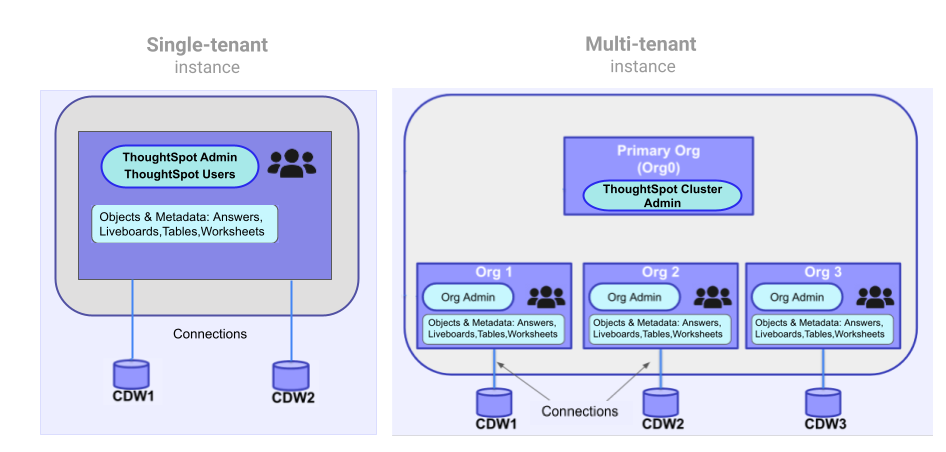
Using Orgs, you can set boundaries within the ThoughtSpot system and isolate each tenant’s data so that it is independent of and invisible to other tenant workspaces configured on the same application instance.
The following figure illustrates the primary difference between a single-tenant and multi-tenant deployment:
|
Important
|
|
Orgs in ThoughtSpot🔗
If the Orgs feature is enabled on your instance, a Primary Org will be created as Org 0.
The Primary Org behaves as the administration Org for all other Orgs in the cluster.
Each Org other than the Primary Org serves as an independent container with its own set of users, groups, and data objects, and provides the same user experience as that of a regular ThoughtSpot instance.
If a user only belongs to a single Org, their experience of ThoughtSpot is as if it were single-tenant.
If a user belongs to multiple Orgs, they will see a menu allowing them to switch between the Orgs they belong to.
All activity within ThoughtSpot is always within the context of one Org, even if the user has access to multiple Orgs. They can switch between Orgs but cannot perform actions across Orgs.
Orgs deployment and administration🔗
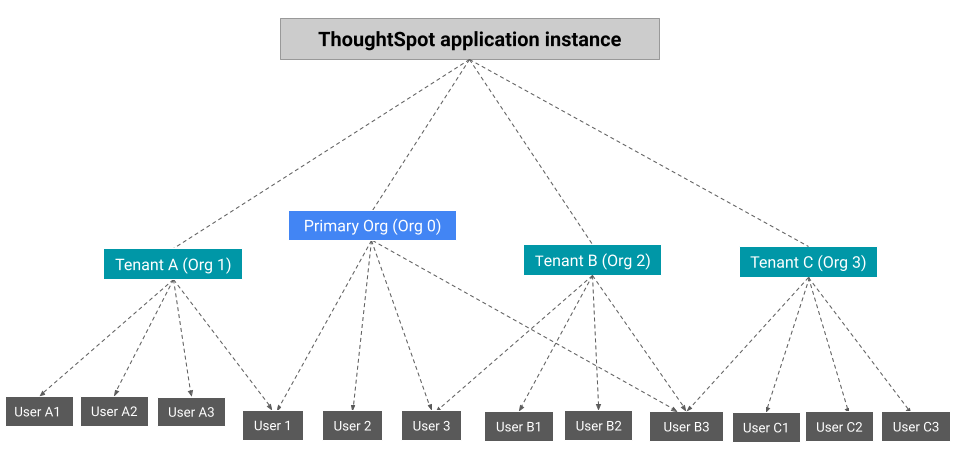
The cluster administrator can create an Org for each tenant account, configure groups and assign users, and define access to data objects within that Org.
The following figure depicts the Orgs presentation on a multi-tenant ThoughtSpot instance.
User roles🔗
On a multi-tenant instance, ThoughtSpot supports the following user roles:
-
Cluster administrator
By default, the administrator of the Primary Org (Org 0) is assigned the privileges of a cluster administrator. The cluster administrator can access all Orgs and perform the following operations:-
Create and manage Orgs
-
Add users to Orgs
-
Administer cluster
-
Manage identity and access management (IAM)
The cluster administrator can also act as an individual Org administrator and perform administration tasks within an Org context.
-
-
Org administrator
An Org administrator administers and manages users, groups, and data objects of their respective Org. Typically, Org administrators create groups within their Org and assign privileges to the users of their Org. -
Org users
An Org user can access only the Orgs to which they belong. A user can belong to more than one Org and access data objects and metadata based on the privileges assigned to the groups to which they belong.
All Orgs scope🔗
On a multi-tenant ThoughtSpot instance, all operations are run in the context of an Org.
If a cluster administrator wants to perform a create, read, update, or delete (CRUD) operation or apply a configuration change to all Orgs, they must override the Org context and apply the changes at the All Orgs level via the UI or API calls. If using the API, the cluster administrator must explicitly set the Org scope to ALL in their API requests.
|
Note
|
|
Per Org custom embed URL (for custom link settings)🔗
A user belonging to multiple Orgs can share ThoughtSpot objects such as Liveboards and Answers with users of another Org. This requires the object to have share permissions and both users to be part of the parent Org of the shared object.
Developers embedding ThoughtSpot in their application can edit their custom link settings for their application users to allow seamless access to content from another Org. For example, a user has access to Org1, Org2, and Org3. While the user is logged in to Org1, they can access a Liveboard shared by another user in Org3 without using the Org switcher.
This feature is turned off by default. To enable this feature on your instance, contact ThoughtSpot Support. When this feature is enabled, the Org ID will be passed as an additional query parameter in the {ts-query-params} in the URL.
For example, if you have set the custom link as:
https://www.mysite.com/liveboard/{object-id}?{ts-query-params}
The resulting URL will be:
https://www.mysite.com/liveboard/22946f4b-b4ce-4643-be50-66afcd5177?orgId=0
The Org ID will be passed in the URL depending on the placement of {ts-query-params} in the custom URL.
|
Note
|
|
Per Org subdomain🔗
To enable the Per Org subdomain feature, contact ThoughtSpot Support. Once this feature is turned on, every existing Org will have a subdomain generated using the following pattern:
<org name>.<cluster name>.thoughtspot.cloud
|
Note
|
Orgs created after the initial request currently require a new request to have their subdomains generated. |
The Per Org subdomain is used to identify a specific Org during login for users who belong to multiple Orgs on the same instance, bypassing the Org selection UI. In particular, OIDC flows for the MCP server or instances with multiple IdPs per Org can benefit from using the Per Org subdomain.
Auto-redirect to the SSO IdP is a separate cluster-level configuration. To enable it, contact ThoughtSpot Support.
|
Note
|
Before you request the Per Org subdomain, make sure that all Org names are DNS-friendly; otherwise, ThoughtSpot returns errors. Review your Org names before the request and make sure they don’t have spaces or other special characters. The subdomains are case-sensitive and match the case of the Org names at the time of the request. |
Feature availability on a multi-tenant instance🔗
On an Orgs-enabled cluster, certain UI and API operations are allowed only at the cluster level. The following table lists the features and configuration operations allowed at the cluster or individual Org level.
| Feature category | At the cluster level (All Orgs) | At the Org level |
|---|---|---|
User management | ✓ User creation and management ✓ User association to Orgs | ✓ User creation and management ✓ User association to groups |
Group provisioning, roles, and privileges | – | ✓ |
Authentication | ✓ Local authentication configuration ✓ Trusted authentication ✓ SAML authentication configuration ✓ OIDC authentication | ✓ Trusted authentication |
Access to | ✓ | ✓ |
Security settings (CORS settings) | ✓ | ✓ |
Security settings (CSP settings) | ✓ | – |
Data connections and objects | – | ✓ Object creation and management ✓ Data connection creation and management
|
Access control | ✓ Org creation for data isolation ✓ User mapping to Orgs | ✓ Groups and privilege assignment to users ✓ Object sharing with other users and groups in the Org |
Customization | ✓ Custom domain configuration ✓ From ID customization for system notifications ✓ Onboarding settings and welcome message customization | – |
Style customization and CSS overrides | ✓ | ✓ Per-Org CSS overrides can be applied using the CSS customization framework available with the Visual Embed SDK. |
Custom actions | – | ✓ Custom action creation and group association are supported by default at the Primary Org (Org 0) level. To enable action customization at the Org level, contact ThoughtSpot Support. |
Link customization for embedded instances | ✓ | ✓ |
REST API and Visual Embed Playgrounds | – | ✓ |
REST API v2.0 endpoints | ✓ Org endpoints for CRUD operations | ✓ |
REST API v1 operations | ✓ Org endpoints for CRUD operations | ✓ |
SSO and Org isolation🔗
ThoughtSpot supports SAML and OIDC group synchronization on multi-tenant clusters. When you use per-org IdP configuration, ThoughtSpot enforces strict Org isolation on all incoming group and Org claims to protect tenant boundaries.
-
Each Org can be bound to its own identity provider.
-
When a user logs in via a per-org IdP, only claims that reference that IdP’s authorized Org are honored. Claims referencing other Orgs are dropped.
-
Dropped claims are recorded as security audit events.
-
Existing manually assigned Org memberships are not removed by a per-org IdP login.
For more information, see Org isolation for per-org IdP authentication.
Authentication considerations for embedded apps🔗
On a multi-tenant cluster with Orgs, ThoughtSpot supports local, SAML, OIDC, and trusted authentication methods. If you are using the Visual Embed SDK to embed ThoughtSpot in your app, use AuthType.Basic for local authentication, AuthType.TrustedAuthToken for trusted authentication, and AuthType.EmbeddedSSO or AuthType.SAMLRedirect for SAML SSO authentication. For more information, see Embed authentication.
Trusted authentication🔗
If trusted authentication is enabled, Org users can obtain authentication tokens using the secret key. An Org administrator or an authorized third-party authenticator service can also generate tokens on behalf of a ThoughtSpot user by using the secret key.
Starting with the ThoughtSpot Cloud 9.2.0.cl release, ThoughtSpot supports generating separate secret keys for each Org. To enable this feature on your instance, contact ThoughtSpot Support. When this feature is enabled, Org users can obtain separate authentication tokens to access their Org and switch between Orgs seamlessly.
Just-in-time user creation and dynamic privilege assignment🔗
If trusted authentication is configured in the SDK, you can request an authentication token by sending API requests to any of the following REST API endpoints:
-
REST API v1 -
/tspublic/v1/session/auth/token -
REST API v2 -
/api/rest/2.0/auth/token/full
If the user doesn’t exist in the ThoughtSpot system, you can autocreate a user account just-in-time and dynamically assign privileges by adding the user to groups.
The /tspublic/v1/session/auth/token API endpoint also allows you to define the Org context in which the user must be logged in after successful authentication. However, API requests to the REST API v2.0 endpoint automatically generate the token based on your current session context.
For more information, see Obtain an authentication token and Trusted authentication.
SAML authentication🔗
|
Note
|
To enable Orgs support for SAML authentication on ThoughtSpot, contact ThoughtSpot Support. |
For SAML authentication, ensure that Orgs support is enabled. For more information, see ThoughtSpot Product Documentation. You must also configure the Org information on your IdP so that the SAML users are allowed to access the Orgs to which they belong.
The following conditions apply to SAML authentication on a multi-tenant setup:
-
If Orgs support is enabled for SAML authentication, and the Org objects to which the user belongs are configured on ThoughtSpot:
-
Multiple Org names can be sent in the SAML assertion.
-
If the Org names are not sent in the SAML assertion, the user is logged in to the default Org (Primary Org).
-
If the user already exists in ThoughtSpot, the user is allowed to access the Orgs sent in the SAML assertion.
-
If the user does not exist in ThoughtSpot, the user is assigned to the Orgs sent in the SAML assertion but is not assigned to any group.
-
If the user is already created in ThoughtSpot and assigned to Orgs and the SAML assertion has different Org names, the user is assigned to only the Orgs sent in the SAML assertion. For example, if a user belongs to Org A and Org B and the SAML assertion includes Org C and Org D, the user is assigned to Org C and Org D and removed from Org A and Org B.
-
-
If Orgs support is enabled for SAML authentication and the Org objects are not configured on ThoughtSpot, the authentication process returns an error.
-
If Orgs support is not enabled for SAML authentication and Org objects are not configured, the user is assigned to the default Org (Primary Org).
OIDC authentication🔗
|
Note
|
To enable Orgs support for OIDC authentication on ThoughtSpot, contact ThoughtSpot Support. |
The following conditions apply to OIDC authentication on a multi-tenant setup:
-
If Org mapping is enabled for OIDC authentication and the Org objects to which the user belongs are configured on ThoughtSpot:
-
Multiple Org names can be sent in the OIDC assertion.
-
If the Org names are not sent in the OIDC assertion, the login fails.
-
If the user does not exist in ThoughtSpot, the user is assigned to the Orgs sent in the OIDC assertion if Auto create user (JIT) is enabled.
-
If the user is already created in ThoughtSpot and assigned to Orgs and the OIDC assertion has different Org names, the user is assigned to only the Orgs sent in the OIDC assertion. For example, if a user belongs to Org A and Org B and the OIDC assertion includes Org C and Org D, the user is assigned to Org C and Org D and removed from Org A and Org B.
-
-
If the Org objects are not configured on ThoughtSpot, the Org mapping with OIDC authentication process returns an error.
-
If Org mapping with OIDC authentication is not enabled on ThoughtSpot and Org objects are not configured, the user is assigned to the default Org (Primary Org).
-
If Org mapping is enabled on the ThoughtSpot cluster, group mapping does not work.
For more information on OIDC authentication, see OpenID Connect authentication.